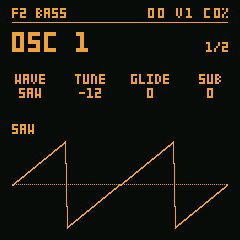
STDF2 BASS
Eight waves (SAW, SQR, TRI, SIN, RAMP, FOLD, FM, OCT), each shaped by PW, with SUB and NOISE.
ObsSynth FM-1 is a synthesizer firmware for the M-VAVE FM-1. This is the real firmware, compiled to WebAssembly: switch it on and play it with the mouse, the computer keyboard or a clip.
Into the simulator, or into an FM-1 over USB. The acid ones play on F9 SUPER.
Pick one and Play (or double-click it).
Loading…
Turn your phone sideways to play the FM-1 at a usable size.
Eight waves (SAW, SQR, TRI, SIN, RAMP, FOLD, FM, OCT), each shaped by PW, with SUB and NOISE.
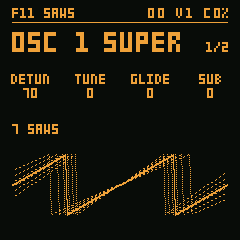
Seven detuned saws per oscillator, spread by DETUN, the outer ones' level by SIDE. On F9 SUPER the four voices stack on one note instead (UNI): the acid clips' sound.
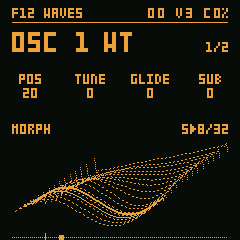
Four wavetable banks, alias-free; an LFO sweeps the position (POS).
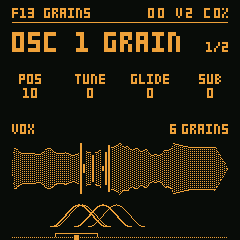
Grains of ORGAN, BELL or VOX, at the note's pitch: POS, SIZE, DENS, SPRAY.
Everything works in the simulator above as on the FM-1. The screen shows one page at a time; the four knobs edit its four values. The buttons not listed have no function yet.
The screen shows one page at a time: its name on top, with the octave, the voices sounding and the CPU, the four values below it, and the page's picture at the bottom. SELECT moves from page to page; the four knobs edit the four columns, in order.
SELECT the pages, KNOB1 to KNOB4 the values, HOME the + page.
OSC 1 is the source. WAVE picks SAW, the brightest, SQR, hollow, TRI, soft, or SIN, pure (and four more, below); SAW and SQR are band-limited, with no aliasing up high. TUNE transposes in semitones, ±24. GLIDE makes each new note slide from the last, from instant to almost a second. SUB adds an oscillator an octave below; the synth's level, VOL, is on the AMP page (EDIT).
SEL (OSC 1): KNOB1 WAVE, KNOB2 TUNE, KNOB3 GLIDE, KNOB4 SUB.
Turn ALGORITHM on an oscillator page and it changes engine; the title shows which. STD is eight waves: SAW, SQR, TRI, SIN, RAMP (a falling saw), FOLD (a folded sine), FM (a sine modulated by its own octave) and OCT (a saw plus a saw an octave up); the OSC + page's PW becomes SHAPE and shapes each of them (SQR's width, TRI's symmetry, how far FOLD folds, FM's index, OCT's octave level). SUPER is seven voices, one in the centre and six detuned around it: the first knob becomes DETUN (how far they spread) and, with HOME, SIDE (the level of the outer ones). Their shape is the first knob on the OSC + page, WAVE: SAW; SQR, whose side widths DETUN spreads too, hollow like a PWM; TRI, spread less and folded more as DETUN rises; SIN, the slow beating of an organ (the SQUARES and GLASS presets). WT reads a wavetable: the first knob becomes POS, the position in the table, and with HOME, TABLE picks the bank (BASIC, S>SAW, HARM, MORPH). The screen shows the wave at that position and a ruler of the table with a marker, which moves by itself when an LFO moves POS. An LFO with DEST POS sweeps the table on its own (the WAVES preset).
GRAIN plays a sample (ORGAN, BELL or VOX, a voice moving through the vowels) in grains: short slices, each with its own window, at the note's pitch. The first knob is POS, where the grains come from; with HOME, SMPL the sample, SIZE each grain's length (10 to 500 ms), DENS how many per second and SPRAY how far each one strays around POS, at random. The screen shows the sample and, while a note sounds, the live grains: each window's arc below and, on the sample, a bar where it is reading, as wide as the window is open. An LFO on POS wanders through the sample (the GRAINS and CHIMES presets).
ALGORITHM the engine; KNOB1 WAVE / DETUN / POS / POS; HOME: KNOB1 PW / SIDE / TABLE, and on GRAIN all four: SMPL SIZE DENS SPRAY.
OSC 2 is a second oscillator in each voice, mixed with the first before the filter. SEMI moves it in semitones (±24: a fifth, an octave), FINE detunes it slightly, up to about 32 cents, for the "fat" sound of two oscillators. MIX sets how much of it you hear: at 0 only OSC 1, at 127 only OSC 2.
SEL twice (OSC 2): KNOB1 WAVE, KNOB2 SEMI, KNOB3 FINE, KNOB4 MIX.
AMP ENV is each note's volume envelope. ATK is the rise, from 1 ms to about 4 s; DEC the fall to SUS, the level held while the key is down; REL the fall after you let go. With SUS at 0 the note sounds like a percussion and ends by itself.
ENV (or SELECT to AMP ENV): KNOB1 ATK, KNOB2 DEC, KNOB3 SUS, KNOB4 REL.
FILTER is a 12 dB low-pass (24 dB with FILTER +'s SLOPE), from 50 Hz to 18 kHz. CUT is the cutoff; RESO the resonance, which lifts the cutoff until it almost sings. ENV sets how far the filter envelope opens (or, negative, closes) the cutoff on each note. KEY makes the cutoff follow the note: at 100% it rises an octave for each octave played, so high notes are not muffled.
SEQ (FILTER): KNOB1 CUT, KNOB2 RESO, KNOB3 ENV, KNOB4 KEY.
FILTER ENV is a second ADSR, for the filter only. With CUT low, ENV high and a short DEC, each note starts open and closes at once: a bass "pluck". With a long ATK, the sound opens slowly, like a pad.
ENV twice (or SELECT to FILTER ENV): KNOB1 ATK, KNOB2 DEC, KNOB3 SUS, KNOB4 REL.
Two LFOs, each with one destination. WAVE picks SIN, TRI, SAW, SQR or S&H (a random level each cycle); RATE goes from 0.05 to 40 Hz; DEST picks what it moves: PITCH (vibrato, up to ±12 semitones), CUT (the filter opening and closing), RESO, AMP (tremolo), MIX (between the two oscillators), POS (WT and GRAIN), or a single oscillator: PIT1 / PIT2 (one's pitch), SHP1 / SHP2 (its SHAPE, the PW), POS1 / POS2, DET1 / DET2 (SUPER's DETUN), and NOISE. DEPTH is how much, one way or the other. Both LFOs can move the same destination: their effects add up. The screen shows the wave as tall as DEPTH, the destination spelled out and a dot where it is now.
LFO (again: LFO 2): KNOB1 WAVE, KNOB2 RATE, KNOB3 DEST, KNOB4 DEPTH.
After the voices, a delay and a reverb, Hortator's. DELAY repeats the sound: TIME goes from 10 ms to 1.5 s, FDBK sets how many repeats, COLR darkens each one (0 dark, 127 open) and MIX is the echoes' level. REVERB is a room: SIZE its size, DAMP how fast the highs die, DLY sends the delay's echoes into the room and MIX is its level. With both MIX at 0 the sound comes out dry.
CHORUS, the third page, is stereo: two reads of a short line, swayed by a slow LFO, one for each side. RATE is the speed, DEPTH how far it sways, WIDTH how far apart the sides go (0: mono) and MIX the level. On headphones and line out the sound opens up; on the speaker, which is mono, the chorus remains.
FX: KNOB1 TIME, KNOB2 FDBK, KNOB3 COLR, KNOB4 MIX. Again: KNOB1 SIZE, KNOB2 DAMP, KNOB3 DLY, KNOB4 MIX. Again: KNOB1 RATE, KNOB2 DEPTH, KNOB3 WIDTH, KNOB4 MIX.
Turn PRESETS to hear the factory ones: INIT, BASS, LEAD, PAD, PLUCK, WOBBLE, BELLS, BRASS, SUPER, STRINGS, SAWS, WAVES, GRAINS and CHIMES. Change whatever you like; to keep it, press SAVE twice: the screen shows SAVED. To save as, on the SAVE page pick another slot with KNOB1 and change the name with KNOB2 (the position) and KNOB3 (the letter) before the second SAVE. Yours come back when the FM‑1 is switched on again, after the factory ones in the PRESETS list. In the simulator, they stay in this browser.
PRESETS to listen; SAVE SAVE saves; SAVE, KNOB1 the slot, KNOB2 KNOB3 the name, SAVE: save as.
Press HOME on any sound page and it turns into its + page (HOME again goes back), with four other knobs. OSC 1 +: PW / SHAPE (SQR's width, the other waves' shape), NOISE and NCOL, the noise's colour (WHITE, PINK, BROWN, VIOL, DIGI, CRACK). OSC 2 +: PW, SYNC (OSC 2 restarts with OSC 1), KEY (follows the keyboard or stays fixed) and RING. AMP ENV +: KEYT (shorter high notes) and LOOP. On the AMP page (EDIT): VOL, VEL, MODE (POLY, MONO, LEGATO, UNI) and VOICE (how many voices; in UNI it becomes DETUN); SUB (an octave below) is on OSC 1. UNI stacks the four voices on one note, detuned by DETUN and spread across the stereo field: the supersaw sound (the SUPER preset). FILTER +: TYPE (LP, BP, HP, NOTCH), DRIVE, VEL and SLOPE (12 or 24 dB). FILTER ENV +: VEL, KEYT, LOOP and AVEL (how much velocity changes the level). LFO +: TRIG (free or restarts on the note), FADE and PHASE. DELAY +: HP on the echoes. REVERB +: PRE (pre-delay) and TONE.
Press HOME and turn KNOB1 to KNOB4; HOME again to go back.
GLO opens GLOBAL, what stays with the device and does not change with the presets: CH (OMNI or a MIDI channel), TUNE (±50 cents, to tune with other instruments), VELC (the MIDI velocity curve: LIN, SOFT, HARD or FIX) and LIGHT (DIM: buttons lit dimly; INV: lit, and the active one goes dark; ON: all lit; OFF: only the active one). Saved on leaving the page. GLO again: GLOBAL 2, with COLOR, the palettes of the ObsSynth panels (OBS, AMBER, FOREST, GREY, LILAC, OCEAN, OLIVA, SOLAR, WINE). With HOME there, INFO shows the firmware version.
GLO: KNOB1 CH, KNOB2 TUNE, KNOB3 VELC, KNOB4 LIGHT.
Hold OCT− and OCT+ together for 5 seconds: the screen shows UBOOT and the FM‑1 enters the chip's boot mode, through which a new firmware (or the original one) is written. If the firmware crashes twice in a row in the first 30 seconds after power-on, it enters that mode by itself.
Hold OCT- + OCT+ for 5 s.
The package, obssynth-fm1-VERSION.fwsc (identity FM-1_627010), is built and signed by GitHub from the tagged source: releases.
Install at your own risk, with no warranty; the author is not liable for damage to your FM‑1.
M-VAVE's updater, M-UPGRADE, puts the original firmware back: at m-vave.com/download, Downloads → PC Software → M-UPGRADE, with PC Firmware → FM-1 V15.
The chip's boot mode cannot be erased: hold OCT− and OCT+ for 5 s, or let the firmware crash twice, and write
the original with the recovery tool (docs/RECOVERY.md) or a
Transporter.